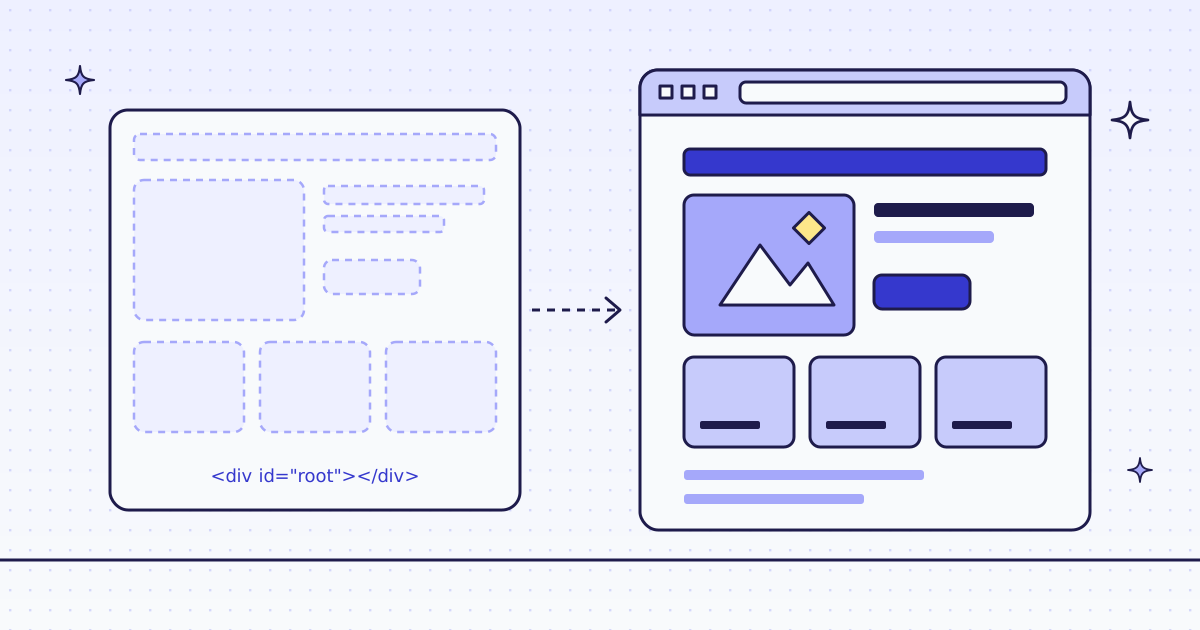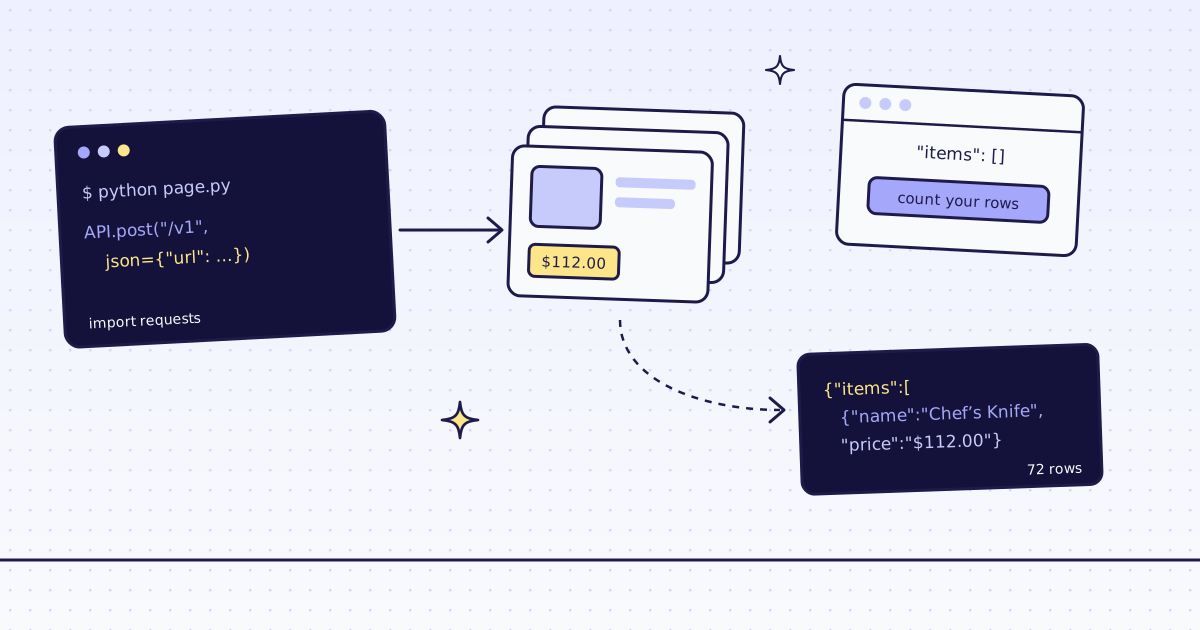
The short answer: httpx returns the HTML a server sends and runs no JavaScript. On a page that draws its list in the browser, you get 200 OK, a heading, and an empty <ul id="arrivals"></ul>: raise_for_status() passes, and the products are not in the text at all. Count the rows you expected and fail loudly when there are none. Then look for wp-json or api in the page source: here the page's script calls the store's public JSON API, which httpx can call directly, over HTTP/2, for free. When a page has no such address, send it to our API with engine=browser.
What httpx gets back
Our test store's new arrivals page draws its list with JavaScript after it loads. Fetch it the plain way:
import re

import httpx

res = httpx.get("https://lab.megalania.io/new-arrivals/", follow_redirects=True)
print(res.status_code, res.http_version, "|", len(res.text), "characters")
print(re.search(r"<ul[^>]*arrivals[^>]*>.*?</ul>", res.text, re.S).group())200 HTTP/1.1 | 56548 characters <ul id="arrivals" class="products columns-4"></ul>
- 56,548 characters and an empty list. The page is big because of its styles and scripts, not its products.
- The regex prints the tag as the server sent it, attributes in their own order. No parser is needed to see that it is empty.
How httpx reports an empty page
Nothing fails, so nothing tells you. Count what you expected to get:
import re

import httpx

res = httpx.get("https://lab.megalania.io/new-arrivals/", follow_redirects=True)
res.raise_for_status()
cards = re.findall(r'<li class="product"', res.text)
print("raise_for_status: passed | cards:", len(cards))
print("'Chef' in the HTML:", "Chef" in res.text, "| 'wp-json' in the HTML:", "wp-json" in res.text)
assert cards, "no cards in #arrivals: the list is drawn by JavaScript"raise_for_status: passed | cards: 0 'Chef' in the HTML: False | 'wp-json' in the HTML: True AssertionError: no cards in #arrivals: the list is drawn by JavaScript
raise_for_status()passed: a 200 with no data is not an error to httpx.- A product name you can see in the browser,
Chef, is not in the HTML.wp-jsonis: the page's script calls the store's JSON API.
The free fix: the page's own API
The page's own script fetches the list from the store's JSON API. Call that address yourself, for free:
import httpx

params = {"orderby": "title", "order": "asc", "per_page": 12, "page": 1}
with httpx.Client(http2=True, base_url="https://lab.megalania.io") as client:
    res = client.get("/wp-json/wc/store/v1/products", params=params)
    products = res.json()
print(res.status_code, res.http_version, "| X-WP-Total:", res.headers.get("X-WP-Total"), "|", len(products), "products")
print([(p["name"], p["prices"]["price"]) for p in products[2:4]])200 HTTP/2 | X-WP-Total: 72 | 12 products
[('Amber Jar Candle Trio', '4200'), ('Bearing Baseplate Compass', '2695')]params=builds the query string, andbase_urlkeeps the paths short. Withhttp2=Truethe call went over HTTP/2.X-WP-Total: 72is the full catalogue;per_page=12is the first page of it. Prices are in cents, as strings.
The fix that climbs: our API
Or send the page to our API with engine=browser. A real Chrome runs the page's script, and we return the fields:
# Run: MEG_API_KEY=YOUR_KEY python fetch.py browser
import os
import sys

import httpx

body = {"url": "https://lab.megalania.io/new-arrivals/", "response_types": "json", "extract": "items:#arrivals li{name:h2|price:.price}*"}
if sys.argv[1:] == ["browser"]:
    body.update(engine="browser", actions="wait_for:#item-12")
res = httpx.post("https://get.megalania.io/v1", headers={"Authorization": f"Bearer {os.environ['MEG_API_KEY']}"}, json=body, timeout=100)
items = res.json().get("items", [])
print(res.status_code, res.headers.get("x-route"), "| credits", res.headers.get("x-credits-charged"), "|", len(items), "items")
print(items[2:4] or "nothing in #arrivals")200 browser/datacenter | credits 19 | 12 items
[{'name': 'Amber Jar Candle Trio', 'price': '$42.00'}, {'name': 'Bearing Baseplate Compass', 'price': '$26.95'}]- With
browser, our Chrome ran the page's script and waited for the 12th card, then theextractrule read name and price from each. - The prices come as the page shows them,
$26.95, not in cents. 19 credits: 15 for the browser, 1 for JSON, 3 for the wait.
The same call without the browser, on the same page:
MEG_API_KEY=YOUR_KEY python fetch.py
200 http/datacenter | credits 2 | 0 items
nothing in #arrivals
- Without the browser, our plain HTTP fetch saw what httpx saw: an empty list, and 2 credits for it.
- Count
itemson our answers the wayseen.pycounts cards.
One honest note: our check for JavaScript shells did not flag this page, because it has a heading and some text. So the plain call was charged for an empty list. Count your rows on every answer, ours included.
What it costs
| What we ran | Route | Credits |
|---|---|---|
| The page in our browser, 12 rows as JSON | c:dc | 19 |
| The same page over plain HTTP: no rows | h:dc | 2 |
gets.py, seen.py and fix.py, straight from httpx | none | 0 |
Every rule is in Credits. Plans are on the pricing page.
How we measured: httpx 0.28.1 with h2 4.4.1 on Python 3.13.5, one Linux server, 17 Nov 2026. Our test store's new arrivals page, which draws 12 products with JavaScript, for the first three scripts. Our API on our dev cluster for fetch.py, against the same store on our dev domain. The outputs are copied from those runs.
Limits
- Public pages only. We do not log in, and we do not solve CAPTCHAs. When a page needs either, we stop and say so, for free.
- A page built by JavaScript needs
engine=browser. It costs more. See How to scrape JavaScript-rendered pages. - Read the site's terms. A page's JSON API is public when the page calls it with no key, but follow the site's terms and robots.txt.
More ways to tell which pages need a browser are in How to scrape JavaScript-rendered pages.