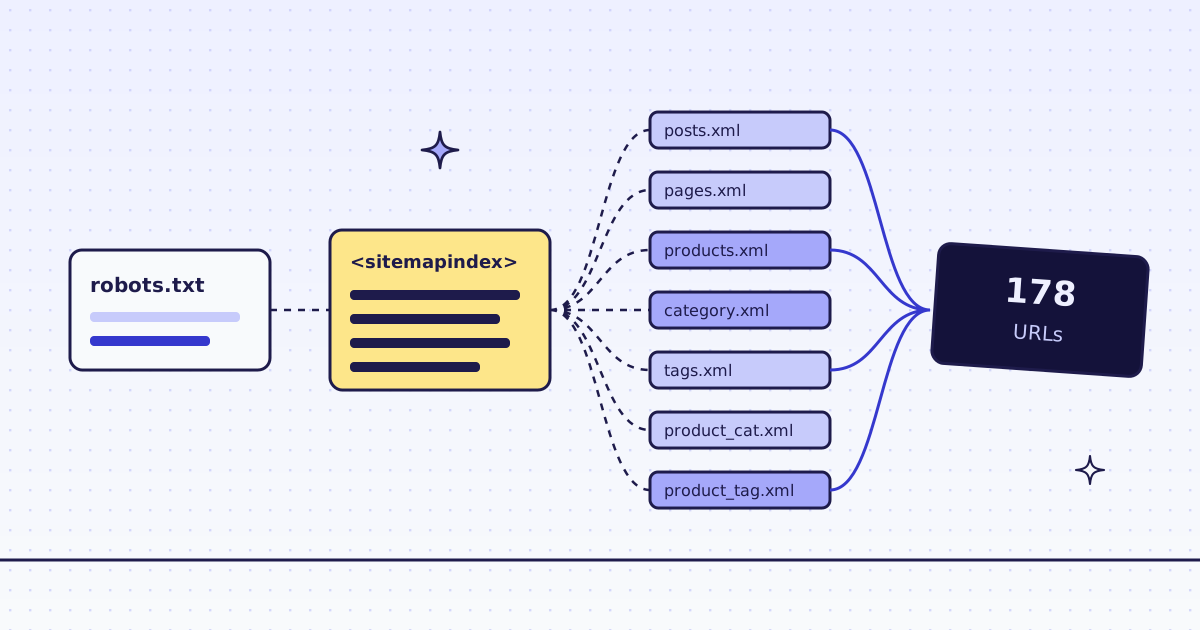
The short answer: to scrape a sitemap XML file in Python, read /robots.txt for the Sitemap: line, download that file, and follow it down when it is a sitemap index. The standard library does it in 40 lines, for free. When a site blocks your plain requests, or you do not want to keep that code, send the home page to POST /v1/map and get the same list back in one call. On our test store, lab.megalania.io, the free script found 178 URLs in 8 sitemap files, and the map found the same 178 plus 6 from the home page, for 4 credits.
What a sitemap is, and where to find it
A sitemap is an XML list of a site’s pages that the owner keeps for search engines. There are two kinds:
- A sitemap (
<urlset>): one<url><loc>per page. - A sitemap index (
<sitemapindex>): one<sitemap><loc>per sitemap file. Big sites split their list this way, often by type: posts, pages, products, tags.
To find it, open /robots.txt. Most sites name their sitemap there:
Sitemap: https://lab.megalania.io/wp-sitemap.xml
With no Sitemap: line, try /sitemap.xml. On the Lab, wp-sitemap.xml is an index of 7 sitemaps: posts, pages, products, post categories, post tags, product categories and product tags.
Scrape sitemap XML in Python, for free
No API, only the standard library. The script reads robots.txt, follows every sitemap index down to the real sitemaps, unzips .xml.gz files, and keeps each URL once.
import gzip
import sys
import urllib.request
import xml.etree.ElementTree as ET

NS = {"sm": "http://www.sitemaps.org/schemas/sitemap/0.9"}


def get(url):
    req = urllib.request.Request(url, headers={"User-Agent": "sitemap-reader/1.0"})
    with urllib.request.urlopen(req, timeout=30) as r:
        body = r.read()
    return gzip.decompress(body) if body[:2] == b"\x1f\x8b" else body


def sitemap_urls(url, seen):
    if url in seen:
        return []
    seen.add(url)
    root = ET.fromstring(get(url))
    if root.tag.endswith("sitemapindex"):
        urls = []
        for loc in root.findall("sm:sitemap/sm:loc", NS):
            urls += sitemap_urls(loc.text.strip(), seen)
        return urls
    return [loc.text.strip() for loc in root.findall("sm:url/sm:loc", NS)]


def sitemaps_from_robots(site):
    text = get(site + "robots.txt").decode("utf-8", "replace")
    found = [line.split(":", 1)[1].strip() for line in text.splitlines()
             if line.lower().startswith("sitemap:")]
    return found or [site + "sitemap.xml"]


site = sys.argv[1] if len(sys.argv) > 1 else "https://lab.megalania.io/"
seen, urls = set(), []
for sm in sitemaps_from_robots(site):
    urls += sitemap_urls(sm, seen)
urls = list(dict.fromkeys(urls))
print(f"{len(seen)} sitemap files, {len(urls)} URLs")
with open("urls.txt", "w") as f:
    f.write("\n".join(urls) + "\n")
Run it:
python sitemap_urls.py https://lab.megalania.io/
What it printed:
8 sitemap files, 178 URLs
urls.txt now holds 178 URLs: 72 products, 8 product categories, 41 product tags, 4 post categories, 26 post tags, and 27 posts and pages. The seen set stops a loop when an index lists itself, and dict.fromkeys drops a URL that two sitemaps both list.
For many sites, this is all you need. It costs nothing.
When the free way stops working
- The site blocks you. A plain request from a server IP can get a 403 or a challenge page instead of XML. Then
ET.fromstringfails on HTML. - There is no sitemap. Then the only list is the links on the pages.
- You do not want the code. Indexes, gzip, a
robots.txtwith threeSitemap:lines, a loop between two indexes: each one is a small fix you keep.
For these, one call does the same work.
One map call (cURL)
curl -sS -X POST https://get.megalania.io/v1/map \
  -H "Authorization: Bearer $MEG_API_KEY" \
  -H "Content-Type: application/json" \
-d '{"url": "https://lab.megalania.io/", "limit": 5000}'{
"urls": [
{"url": "https://lab.megalania.io/how-to-pitch-a-tent-in-the-rain/", "source": "sitemap"},
{"url": "https://lab.megalania.io/?add-to-cart=73", "source": "link"}
],
"truncated": false
}The map reads the start page, /robots.txt, the sitemaps it names (or /sitemap.xml), and the sitemaps an index lists, gzipped ones too, up to 10 files. source says where each URL came from: sitemap first, then link for the start page’s links that the sitemaps did not have. When the datacenter route is blocked, the map tries residential. It never runs a browser and never fetches the pages it lists. Every detail is in Map a site.
With no sitemap at all, the map still gives you the start page’s links. That is a start, not the whole site. For every page, crawl instead: How to crawl a website to Markdown for an LLM.
Python: the whole site, then only the products
search keeps only the URLs that contain a text. Here it picks the product pages.
import os
from collections import Counter
from urllib.parse import urlsplit

import requests

API = "https://get.megalania.io"
HEADERS = {"Authorization": f"Bearer {os.environ['MEG_API_KEY']}"}
SITE = "https://lab.megalania.io/"


def map_site(**body):
    r = requests.post(f"{API}/v1/map", json={"url": SITE, "limit": 5000, **body}, headers=HEADERS, timeout=120)
    r.raise_for_status()
    return r.json()["urls"], int(r.headers["X-Credits-Charged"])


urls, cost = map_site()
print(f"map: {len(urls)} URLs, {cost} credits")
print(" by source:", dict(Counter(u["source"] for u in urls)))

products, cost = map_site(search="/product/")
print(f"search=/product/: {len(products)} URLs, {cost} credits")
with open("products.txt", "w") as f:
    f.write("\n".join(u["url"] for u in products) + "\n")
Run it:
pip install requests
export MEG_API_KEY='meg_sk_...'
python map_site.py
What it printed:
map: 184 URLs, 4 credits
 by source: {'sitemap': 178, 'link': 6}
search=/product/: 72 URLs, 4 credits
The 178 sitemap URLs are the same 178 the free script found. The 6 link URLs came from the home page: 5 “Add to cart” links and the RSS feed. Neither is a page you want to fetch, which is why the sitemap is the better list.
products.txt holds the 72 product pages. Send them as one batch to fetch them: Batches. To turn them into rows, see How to scrape a website to CSV.
From an AI agent (MCP)
The MCP tool map_site takes the same url, limit and search. We asked it for search: "/product-category/" on the Lab, and it answered: “Found 8 URLs: 8 from sitemaps, 0 from links on the start page”, then the 8 category URLs, for 4 credits. An agent can map first, then pick the pages it really needs.
What it costs
| Step | Credits |
|---|---|
| Your own script on a site that lets you in | 0 |
| A map, on the datacenter route | 4 |
A map with search |
4, the same |
| A map that finds no URL because the start page was blocked or an error | 0 |
These prices are for this site on the datacenter route. A map on the residential route costs that route’s prices on top. Check a site first with GET /v1/tier?host=... or the MCP tool check_site; both are free. Plans are on the pricing page.
How we measured: our dev cluster on 16 Nov 2026, the Lab store on our dev domain, one run of each script above and one MCP call.
Limits
- A sitemap is what the owner put in it. It can miss pages, and it can list old ones. Expect a few 404s when you fetch the list.
- Not every URL is a page you want. The Lab’s sitemap lists
/cart/,/checkout/and/my-account/. Drop them before you fetch. - The map reads at most 10 sitemap files and returns at most 5,000 URLs.
truncated: truemeans there may be more. A sitemap index with hundreds of files needs your own script, or several maps withsearch. - Only the same site. The map keeps the site’s own host, and its subdomains only with
include_subdomains.
Fetch public pages only. Read the site’s terms and robots.txt, and follow them.