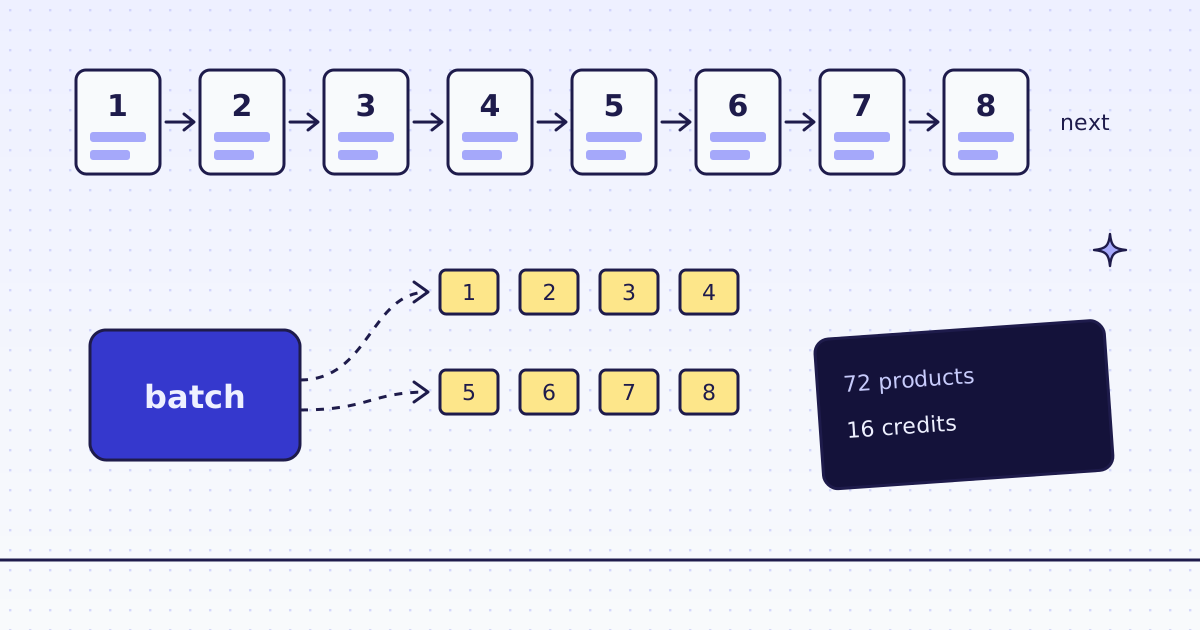
The short answer: a list with page numbers has two easy ways in. Follow next: read page 1, take the link to page 2 from it, and go on until there is no next link. It is simple and it always works, but it is slow, because each page waits for the one before. One batch: read page 1, take the last page number, build the URLs of the other pages, and send them as one batch. They run at the same time. On our test store’s shop, 8 pages and 72 products, both ways cost 16 credits. Following next took 10 to 14 seconds, and the batch took 6 to 7.5 seconds.
How a paginated list looks
Most stores and blogs show a few items per page and a row of page links under them. On the Lab, a WooCommerce store, the row looks like this (shortened):
<ul class="page-numbers">
  <li><span aria-current="page" class="page-numbers current">1</span></li>
  <li><a class="page-numbers" href="https://lab.megalania.io/shop/page/2/">2</a></li>
  <li><a class="page-numbers" href="https://lab.megalania.io/shop/page/3/">3</a></li>
  <li><a class="page-numbers" href="https://lab.megalania.io/shop/page/4/">4</a></li>
  <li><span class="page-numbers dots">…</span></li>
  <li><a class="page-numbers" href="https://lab.megalania.io/shop/page/6/">6</a></li>
  <li><a class="page-numbers" href="https://lab.megalania.io/shop/page/7/">7</a></li>
  <li><a class="page-numbers" href="https://lab.megalania.io/shop/page/8/">8</a></li>
  <li><a class="next page-numbers" href="https://lab.megalania.io/shop/page/2/">→</a></li>
</ul>
Two things in it are useful: the next link, and the page numbers. Note the …: page 5 has no link on page 1. So do not collect the page links and fetch them; take the highest number and build every URL up to it. Page 2 lives at /shop/page/2/, page 3 at /shop/page/3/, and so on. Other sites use ?page=2 or ?p=2. Click page 2 in your browser and look at the address bar.
The rules
One rule reads the items on a page. Here, the name and the link of each product card:
items:li.product{name:h2|url:a.woocommerce-loop-product__link@href}*For “follow next”, add the next link. It is null on the last page:
|next:a.next@href
For “one batch”, add the text of every page link instead. On page 1 that is ["2", "3", "4", "6", "7", "8", "→", "2", "3", ...]: the Lab shows the row above and below the list, so every number comes twice. That does not matter, because we only want the biggest number, the last page:
|pages:a.page-numbers*
Python: both ways in one script
follow_next sends one request per page and stops when next is null. one_batch reads page 1, builds the URLs of pages 2 to 8, and sends them to the batch API in one call. Then it waits for the batch, lists its items, and downloads each result.
import os
import time
import uuid
import requests

GET = "https://get.megalania.io/v1"
API = "https://api.megalania.io/v1/batches"
HEADERS = {"Authorization": f"Bearer {os.environ['MEG_API_KEY']}"}
START = "https://lab.megalania.io/shop/"
ITEMS = "items:li.product{name:h2|url:a.woocommerce-loop-product__link@href}*"


def one(url, rules):
    r = requests.get(GET, params={"url": url, "response_types": "json", "extract": rules},
                     headers=HEADERS, timeout=120)
    r.raise_for_status()
    return r.json(), int(r.headers["X-Credits-Charged"])


def follow_next():
    url, items, spent = START, [], 0
    while url:
        page, cost = one(url, ITEMS + "|next:a.next@href")
        items += page["items"]
        spent += cost
        url = page["next"]
    return items, spent


def one_batch():
    first, spent = one(START, ITEMS + "|pages:a.page-numbers*")
    last = max(int(p) for p in first["pages"] if p.isdigit())
    urls = [f"{START}page/{n}/" for n in range(2, last + 1)]
    body = {"urls": urls, "response_types": "json", "extract": ITEMS, "max_credits": 8}
    batch = requests.post(API, json=body, headers={**HEADERS, "Idempotency-Key": str(uuid.uuid4())}, timeout=60)
    batch.raise_for_status()
    bid = batch.json()["id"]
    while True:
        b = requests.get(f"{API}/{bid}", params={"wait_seconds": 25}, headers=HEADERS, timeout=60).json()
        if b["status"] in ("done", "failed", "canceled"):
            break
    spent += b["counts"]["charged_credits"]
    items = list(first["items"])
    page = requests.get(f"{API}/{bid}/items", params={"limit": 1000}, headers=HEADERS, timeout=60).json()
    for item in sorted(page["items"], key=lambda i: i["position"]):
        if item["result_url"]:
            items += requests.get(item["result_url"], timeout=60).json()["items"]
        else:
            print("no result for page", item["position"] + 1, item["error"])
    return items, spent


for way in (follow_next, one_batch):
    t = time.monotonic()
    items, spent = way()
    print(f"{way.__name__}: {len(items)} products, {spent} credits, {time.monotonic() - t:.1f} s")
Run it:
pip install requests
export MEG_API_KEY='meg_sk_...'
python paginate.py
What the first run printed:
follow_next: 72 products, 16 credits, 13.8 s
one_batch: 72 products, 16 credits, 7.5 s
A few details in the batch part:
- The batch lives on the API host,
api.megalania.io, not onget.megalania.io. One request is one answer; a batch outlives the call that made it. wait_seconds=25holds the answer until the batch ends, or 25 seconds pass. So the loop never sleeps blind and never hammers the API.Idempotency-Keymakes a retry safe. If your call to create the batch times out and you send it again with the same key, you get the same batch back, not a second one and a second bill.max_credits: 8is the most one page may cost. A page above it fails for free instead of climbing to an expensive route.- Each
result_urlis signed for 15 minutes and needs no key. List the items again for a fresh link. positionis the place of the URL in your list, so page order stays right. Page 2 is position 1.
Which way to use
| Follow next | One batch | |
|---|---|---|
| Credits, 8 pages | 16 | 16 |
| Time, 3 runs | 10.3 to 13.8 s | 6.0 to 7.5 s |
| Needs the last page number | No | Yes |
| Works when the URL pattern is odd | Yes | No |
| Code | 10 lines | 25 lines |
- Follow next for a few pages, or when the page URLs have no clear pattern (a cursor, a token, a date).
- One batch for many pages with a clear pattern. The gap grows with the page count: 8 pages one after another take 8 round trips, and a batch runs them side by side. A batch also keeps no connection open while it runs, so it suits a cron job.
- A crawl when you do not know the pages at all: send one start URL with
crawland path rules, and we follow the links for you. See How to crawl a website to Markdown for an LLM.
What it costs
Each page cost 2 credits: 1 for the page on the datacenter route and 1 for the JSON output. 8 pages, 16 credits, either way. A batch is priced like single requests; it is not cheaper and not more expensive.
When we ran the script again within 5 minutes, the pages came from our recent copy: 8 credits for the 8 pages, and follow_next took 0.4 seconds. That is the default, and max_age sets the window: Reuse a recent copy. Send max_age=0 when you must have a fresh page. All three timing runs above fetched fresh pages: the first because nothing was cached yet, the other two with max_age=0.
Blocks we detect cost 0, and errors cost 0. In a batch, a blocked page is counted in free_count and has no result_url.
How we measured: our dev cluster on 16 Nov 2026, the Lab store on our dev domain, three runs of each way with fresh pages, and two runs that hit the recent copy.
When pagination is harder
- No page numbers, only “Load more”. The next items come from JavaScript. See How to scrape infinite scroll and load-more pages.
- The last page number is hidden. Some sites show “1 2 3 … next” only. Follow next, or build URLs and stop at the first page with no items.
- The list changes while you read it. A new product on page 1 pushes one item to page 2, and you see it twice. Remove duplicates by URL.
- Very deep pages. Some sites stop serving pages after a limit, whatever the count says. Narrow the list with a category or a filter instead.
Fetch public pages only. Do not log in. Read the site’s terms and robots.txt, and follow them. Keep your rate low, and keep batches to the size you need.