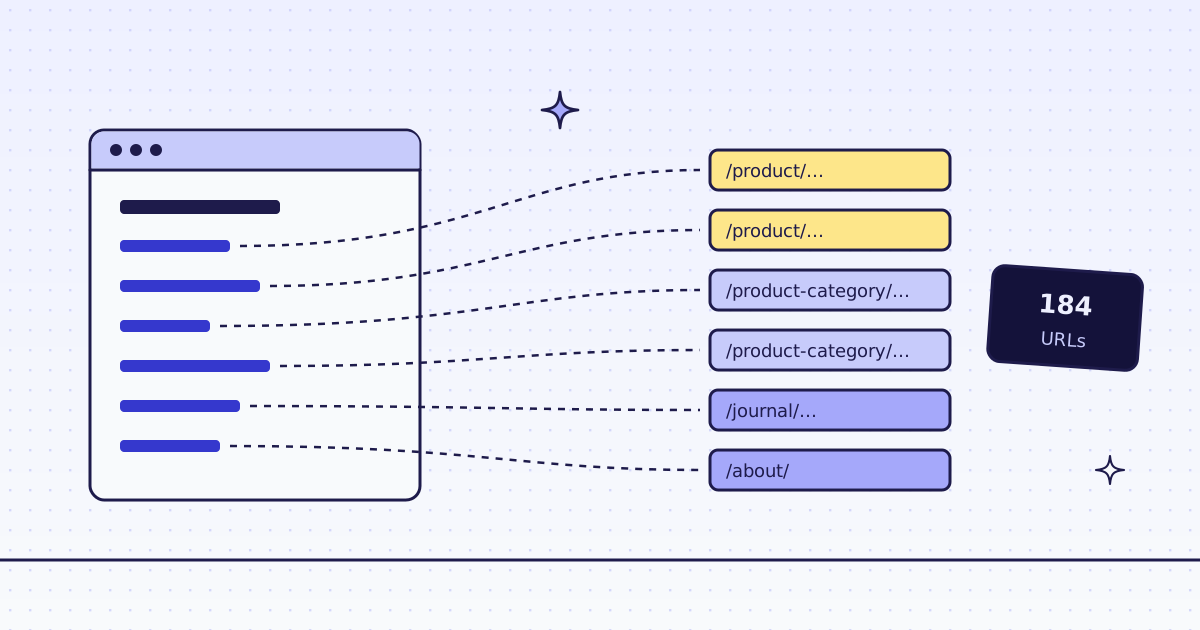
The short answer: for the links on one page, send it with response_types=links. You get a JSON list of every link, absolute, once each, with its anchor text, for 1 credit. For every URL of a site, send the home page to POST /v1/map. It reads the site’s sitemaps and the links on the start page, and returns one list. On our test store, lab.megalania.io, the home page had 39 links and the map found 184 URLs, for 4 credits.
The free way first
For one page you can download yourself, Python can list the links with no API:
from html.parser import HTMLParser
from urllib.parse import urljoin
import requests

class Links(HTMLParser):
    def __init__(self, base):
        super().__init__()
        self.base, self.urls = base, set()

    def handle_starttag(self, tag, attrs):
        href = dict(attrs).get("href")
        if tag == "a" and href and not href.startswith(("#", "mailto:", "javascript:")):
            self.urls.add(urljoin(self.base, href))

url = "https://lab.megalania.io/"
p = Links(url)
p.feed(requests.get(url, timeout=30).text)
print(len(p.urls))
And for a whole site, look at /robots.txt first: it often names the sitemap, a list of the site’s pages that the owner keeps for search engines. Many sites are easy that way.
Use an API when the site blocks your plain requests, when the links are added by JavaScript, or when you do not want to write a sitemap reader that handles sitemap indexes and gzipped files.
One page: every link with its text (cURL)
curl -sS -G https://get.megalania.io/v1 \
  -H "Authorization: Bearer $MEG_API_KEY" \
  --data-urlencode "url=https://lab.megalania.io/" \
  --data-urlencode "response_types=links"
The answer is a JSON list (shortened):
[
  {"url": "https://lab.megalania.io/shipping/", "text": "Shipping"},
  {"url": "https://lab.megalania.io/product-category/camping/", "text": "Camping"},
  {"url": "https://lab.megalania.io/product/hearthstone-skillet/", "text": "Hearthstone 26 cm Cast Iron Skillet Rated 4.50 out of 5 $64.00"},
  {"url": "https://lab.megalania.io/?add-to-cart=73", "text": "Add to cart"}
]- Every
httpandhttpslink, made absolute, once each. Ajavascript:ormailto:link is not in it. textis the anchor text. On a product card that is the whole card: name, rating and price.- It cost 1 credit: the page, with no extra charge for the
linksoutput.
The whole site: one map call (cURL)
curl -sS -X POST https://get.megalania.io/v1/map \
  -H "Authorization: Bearer $MEG_API_KEY" \
  -H "Content-Type: application/json" \
-d '{"url": "https://lab.megalania.io/", "limit": 5000}'{
"urls": [
{"url": "https://lab.megalania.io/how-to-pitch-a-tent-in-the-rain/", "source": "sitemap"},
{"url": "https://lab.megalania.io/?add-to-cart=73", "source": "link"}
],
"truncated": false
}The map reads the start page, /robots.txt, and the sitemaps it names (or /sitemap.xml), up to 10 sitemap files. source says where each URL came from. It never runs a browser, and it does not fetch the pages it lists. That is why it is cheap: Map a site has every detail.
Python: links of two pages, then the site
The script lists the links of the home page and of the journal page, splits them into links on the site and links to other sites, and then maps the whole site. It drops URLs with a query (here, the “Add to cart” links) and counts the rest by section.
import os
from collections import Counter
from urllib.parse import urlsplit

import requests

API = "https://get.megalania.io"
HEADERS = {"Authorization": f"Bearer {os.environ['MEG_API_KEY']}"}
SITE = "https://lab.megalania.io/"
HOST = urlsplit(SITE).hostname


def page_links(url):
    r = requests.get(f"{API}/v1", params={"url": url, "response_types": "links"}, headers=HEADERS, timeout=120)
    r.raise_for_status()
    return r.json(), int(r.headers["X-Credits-Charged"])


for url in (SITE, SITE + "journal/"):
    links, cost = page_links(url)
    inside = [l for l in links if urlsplit(l["url"]).hostname == HOST]
    outside = [l for l in links if urlsplit(l["url"]).hostname != HOST]
    actions = [l for l in inside if urlsplit(l["url"]).query]
    print(f"{url}: {len(links)} links, {len(inside)} on the site ({len(actions)} with a query), "
          f"{len(outside)} to other sites, {cost} credit(s)")

r = requests.post(f"{API}/v1/map", json={"url": SITE, "limit": 5000}, headers=HEADERS, timeout=120)
r.raise_for_status()
urls = r.json()["urls"]
print(f"map: {len(urls)} URLs, {r.headers['X-Credits-Charged']} credits, truncated: {r.json()['truncated']}")
print(" by source:", dict(Counter(u["source"] for u in urls)))
urls = [u for u in urls if not urlsplit(u["url"]).query]


def section(url):
    parts = urlsplit(url).path.strip("/").split("/")
    return parts[0] if len(parts) > 1 else "page"


print(f" {len(urls)} without a query, by section:", dict(Counter(section(u["url"]) for u in urls)))
with open("lab-urls.txt", "w") as f:
    f.write("\n".join(u["url"] for u in urls) + "\n")
Run it:
pip install requests
export MEG_API_KEY='meg_sk_...'
python links.py
What it printed:
https://lab.megalania.io/: 39 links, 38 on the site (5 with a query), 1 to other sites, 1 credit(s)
https://lab.megalania.io/journal/: 47 links, 46 on the site (0 with a query), 1 to other sites, 1 credit(s)
map: 184 URLs, 4 credits, truncated: False
 by source: {'sitemap': 178, 'link': 6}
 179 without a query, by section: {'page': 28, 'product': 72, 'category': 4, 'tag': 26, 'product-category': 8, 'product-tag': 41}
lab-urls.txt now holds 179 URLs, one per line: 72 products, 8 categories, 41 product tags, the journal posts and the other pages. Feed it to a batch to fetch the pages, or pick only the /product/ lines first.
What it costs
| Step | Credits |
|---|---|
| The links of one page | 1 |
| A map of the whole site (start page, robots.txt, sitemaps) | 4 |
| A map that finds no URL because the start page was blocked or an error | 0 |
These prices are for this site on the datacenter route. A site that blocks it costs more. Check yours first with GET /v1/tier?host=... or the MCP tool check_site; both are free.
How we measured: our dev cluster on 16 Nov 2026, the Lab store on our dev domain, one run of the script above.
Which one to use
- The links of one page:
response_types=links. Good for a menu, a category page or a list of posts. - Every URL of a site:
POST /v1/map. Most sites keep a sitemap. If a site has none, the map gives only the start page’s links. Then crawl. - Every link on every page: a crawl. Send one start URL as a batch with
crawl, and we follow the links for you, with path rules and a page cap. Each page is charged. See How to crawl a website to Markdown for an LLM.
Limits
- A sitemap can be old. It lists what the owner put in it, which is not always every page, and not always only live pages. Expect a few 404s when you fetch the list.
- Links added by JavaScript are not in the HTML that the map and
linksread. Sendengine=browserwithlinksfor one page; the map never uses the browser. - Action links. “Add to cart”, “log out” or “delete” links are links too. Drop URLs with a query, or anything you do not want to fetch, before you send them on.
- Only the same site. The map lists the site’s own host, and its subdomains only when you ask for them.
Fetch public pages only. Read the site’s terms and robots.txt, and follow them. A crawl can respect robots.txt for you with respect_robots.