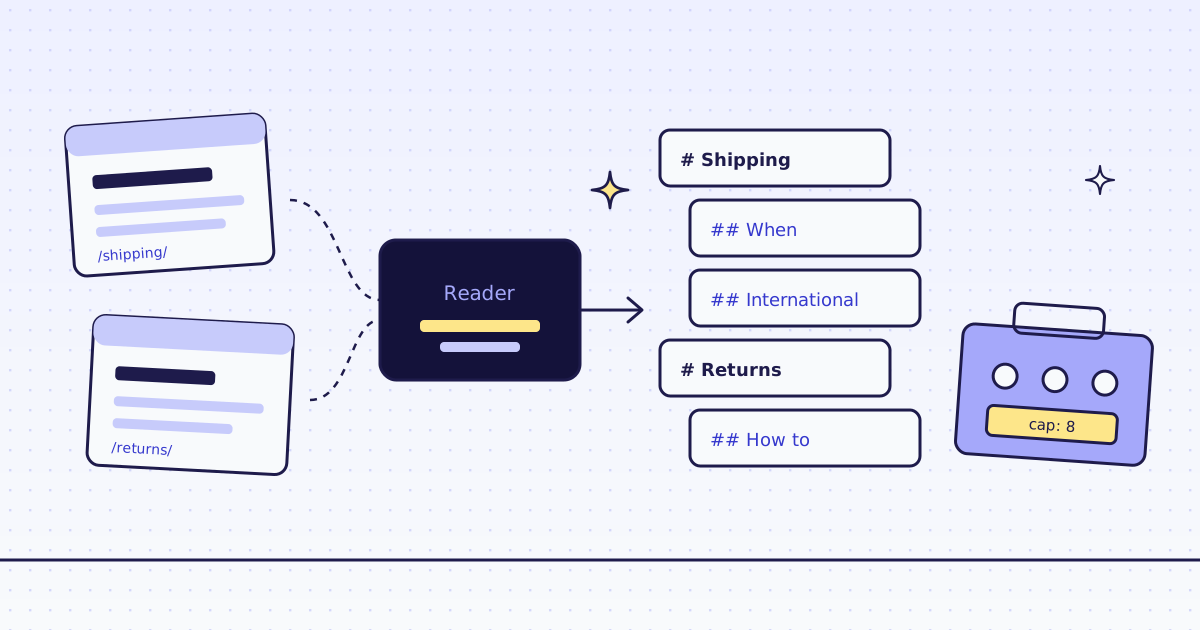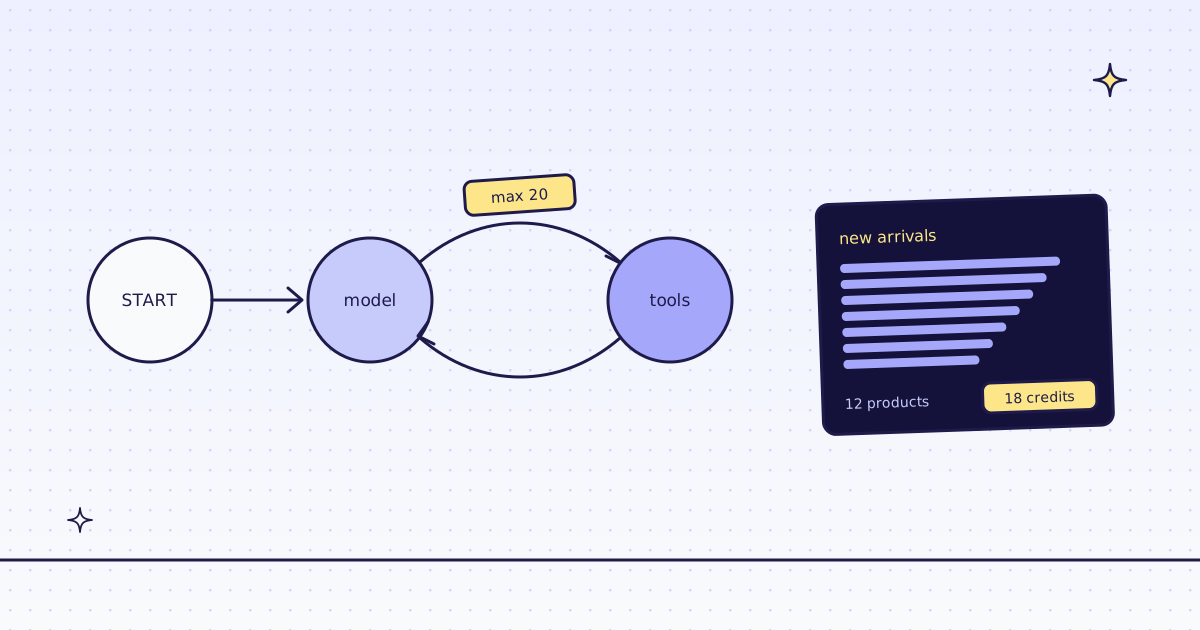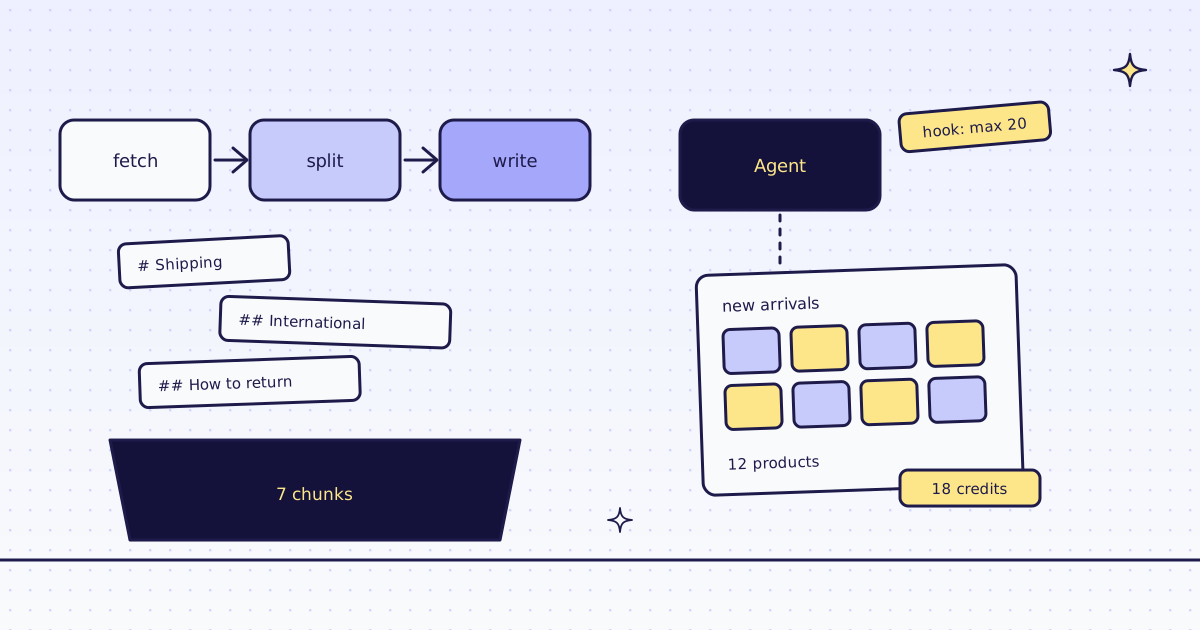
The short answer: for Haystack web scraping, use two things. For a pipeline, a small custom component calls our Python SDK and returns each page as a Haystack Document in Markdown, so MarkdownHeaderSplitter can split it at real headings. For an agent, MCPToolset from mcp-haystack loads our hosted MCP tools, and a before_tool hook sets max_credits, so the model cannot raise what a page may cost. On our test store, lab.megalania.io, two pages became 7 chunks for 2 credits, and the agent read a JavaScript page with 12 products for 18 credits.
The free way first
Haystack can read a page on its own: LinkContentFetcher downloads it, and HTMLToDocument keeps the main text.
from haystack.components.converters import HTMLToDocument
from haystack.components.fetchers import LinkContentFetcher
from haystack.components.preprocessors import MarkdownHeaderSplitter

streams = LinkContentFetcher().run(urls=["https://lab.megalania.io/shipping/"])["streams"]
doc = HTMLToDocument().run(sources=streams)["documents"][0]
chunks = MarkdownHeaderSplitter().run(documents=[doc])["documents"]
print(len(streams[0].data), "bytes of HTML ->", len(doc.content), "characters,", doc.content.count("#"), "heading marks,", len(chunks), "chunk(s)")55411 bytes of HTML -> 604 characters, 0 heading marks, 1 chunk(s)
That is good. HTMLToDocument uses trafilatura (pip install trafilatura), and it dropped the menus and kept the shipping table. It also dropped the headings: the page’s title was gone and its section titles became plain lines, so the splitter made one chunk of the whole page. Use it when that is enough, it is free.
Use our API when you want the headings for chunking, when a site blocks plain requests, or when a page needs a browser.
A pipeline: fetch, split at headings, write
pip install haystack-ai megalania
export MEG_API_KEY='meg_sk_...'
from haystack import Document, Pipeline, component
from haystack.components.preprocessors import MarkdownHeaderSplitter
from haystack.components.retrievers.in_memory import InMemoryBM25Retriever
from haystack.components.writers import DocumentWriter
from haystack.document_stores.in_memory import InMemoryDocumentStore
from megalania import Megalania


@component
class MegalaniaFetcher:
    @component.output_types(documents=list[Document])
    def run(self, urls: list[str]):
        with Megalania() as meg:
            pages = meg.read_pages(urls)
            return {"documents": [Document(content=text, meta=meta) for text, meta in pages]}


store = InMemoryDocumentStore()
index = Pipeline()
index.add_component("fetch", MegalaniaFetcher())
index.add_component("split", MarkdownHeaderSplitter())
index.add_component("write", DocumentWriter(document_store=store))
index.connect("fetch", "split")
index.connect("split", "write")

result = index.run({"fetch": {"urls": ["https://lab.megalania.io/shipping/", "https://lab.megalania.io/returns/"]}})
print(result["write"]["documents_written"], "chunks written")
for d in store.filter_documents():
    print(" ", d.meta["source"], d.meta["credits_charged"], "|", d.content.splitlines()[0])

hits = InMemoryBM25Retriever(document_store=store, top_k=1).run(query="Do you ship to Canada?")
print(hits["documents"][0].content)7 chunks written https://lab.megalania.io/shipping/ 1 | # Shipping https://lab.megalania.io/shipping/ 1 | ## When will my order leave? https://lab.megalania.io/shipping/ 1 | ## International https://lab.megalania.io/returns/ 1 | # Returns https://lab.megalania.io/returns/ 1 | ## How to return https://lab.megalania.io/returns/ 1 | ## Faults and repairs https://lab.megalania.io/returns/ 1 | ## What we can’t take back ## International We ship to Canada and Mexico. Duties and taxes are paid by the receiver. *This is a demo store. No order is ever shipped.*
read_pagesasks for Markdown and yields each page’s text withsource,request_id,credits_chargedandtarget_status. The key comes fromMEG_API_KEY.- Each chunk knows its place.
MarkdownHeaderSplitterputs the section inmeta["header"]and the headings above it inmeta["parent_headers"]. - BM25 matches words, not meaning. We first asked “How long does international shipping take?”, and the top chunk was “Faults and repairs”: its text says “as long as you own it”. With the page’s own words, “ship to Canada”, the right chunk came first. For questions in your users’ words, use an embedding retriever.
An Agent with MCP tools and a cap
pip install haystack-ai mcp-haystack
The model below is scripted, so you can run the whole agent without a model key: it asks for three tool calls, then stops. In your own agent, chat_generator is your chat model.
import json

from haystack import component
from haystack.components.agents import Agent, State
from haystack.components.agents.state.state_utils import replace_values
from haystack.dataclasses import ChatMessage, ToolCall
from haystack.hooks import hook
from haystack.utils import Secret
from haystack_integrations.tools.mcp import MCPToolset, StreamableHttpServerInfo

tools = MCPToolset(
    server_info=StreamableHttpServerInfo(url="https://mcp.megalania.io/", token=Secret.from_env_var("MEG_API_KEY")),
    tool_names=["check_site", "scrape", "extract"],
)


@hook
def cap(state: State) -> None:
    last = state.data["messages"][-1]
    calls = [ToolCall(c.tool_name, {**c.arguments, "max_credits": 20} if c.tool_name in {"scrape", "extract"} else c.arguments, c.id)
             for c in last.tool_calls]
    state.set("messages", state.data["messages"][:-1] + [ChatMessage.from_assistant(tool_calls=calls)], handler_override=replace_values)


PLAN = [
    ("check_site", {"host": "lab.megalania.io"}),
    ("scrape", {"url": "https://lab.megalania.io/new-arrivals/", "engine": "browser", "actions": [{"wait_for": "#item-12"}], "max_credits": 500}),
    ("scrape", {"url": "https://lab.megalania.io/new-arrivals/", "engine": "browser", "proxy_tier": "residential", "max_credits": 500}),
]


@component
class ScriptedModel:
    @component.output_types(replies=list[ChatMessage])
    def run(self, messages: list[ChatMessage], tools=None, **kwargs):
        done = sum(m.tool_call_result is not None for m in messages)
        if done < len(PLAN):
            name, args = PLAN[done]
            return {"replies": [ChatMessage.from_assistant(tool_calls=[ToolCall(name, args, f"call-{done}")])]}
        return {"replies": [ChatMessage.from_assistant("done")]}


agent = Agent(chat_generator=ScriptedModel(), tools=tools, hooks={"before_tool": [cap]})
result = agent.run(messages=[ChatMessage.from_user("List the new arrivals with prices.")])
print(sorted(t.name for t in tools))
for m in result["messages"]:
    r = m.tool_call_result
    if r is None:
        continue
    if r.error:
        print(r.origin.tool_name, "| error |", r.result.split("Failed: ")[1][:150].replace("\\n", " "))
        continue
    out = json.loads(r.result)["structuredContent"]
    if r.origin.tool_name == "check_site":
        print("check_site | ok | quotes", out["price"]["quotes"])
    else:
print(r.origin.tool_name, "| ok |", out["content"].count("\n- "), "products |", out["route"], "| credits", out["credits_charged"])['check_site', 'extract', 'scrape']
check_site | ok | quotes {'browser': 15, 'browser_residential': 32, 'datacenter': 1, 'residential': 8}
scrape | ok | 12 products | browser/datacenter | credits 18
scrape | error | max credits too low. max_credits is below the lowest price on this site, 32 credits. You are not charged. Raise max_credits to at least 32, or remove- The key is a
Secretread fromMEG_API_KEYand sent as a bearer token on the connection, never in the URL. - Three tools, not 15.
tool_nameskeeps the model’s prompt short, and keeps batches and monitors out of its reach. - The hook runs before every tool call. The model asked for
max_credits: 500twice; the hook sent 20. Onlyscrapeandextracttakemax_credits, so it leavescheck_sitealone. check_siteis free, and it gave this host’s prices: 1 credit a page over plain HTTP, 15 in the browser, 32 in the browser on a residential exit.- The JavaScript page came back with all 12 products for 18 credits: 15 for the browser and 3 for the wait. 18 fits under 20.
- The residential browser costs 32 on this host, so we refused it before fetching anything, for 0 credits. The Agent got the reason as a tool error, and a real model can choose a cheaper route or stop.
What it costs
| Step | Credits |
|---|---|
check_site |
0 |
| A plain page as Markdown | 1 |
| A JavaScript page in the browser, with one action | 18 |
A call refused by max_credits |
0 |
| A block we detect, or one of our errors | 0 |
These prices are for our test store on the datacenter route. A site that blocks it costs more, and check_site shows how much. All the rules are in Credits. Plans are on the pricing page.
How we measured: our dev cluster on 16 Nov 2026, the Lab store on our dev domain, haystack-ai 3.5.0, mcp-haystack 2.1.2, megalania 0.3.0 and trafilatura 2.3.1 on Python 3.13. We ran the three scripts as above; the outputs are copied from those runs.
Limits
- Page text is untrusted. A page can hide instructions for a model. Our tool descriptions tell the agent never to follow them. Say it in your system prompt too.
- Public pages only. We do not log in, and we do not solve CAPTCHAs. When a page needs either, we stop and say so, for free.
- An empty list can still be a charged answer. Our check for JavaScript shells misses pages that have a heading and some text. Count the rows you expected.
Every tool and argument is in MCP for agents. The same pattern in LlamaIndex is in LlamaIndex web scraping. Fetch public pages only. Read the site’s terms and robots.txt, and follow them.